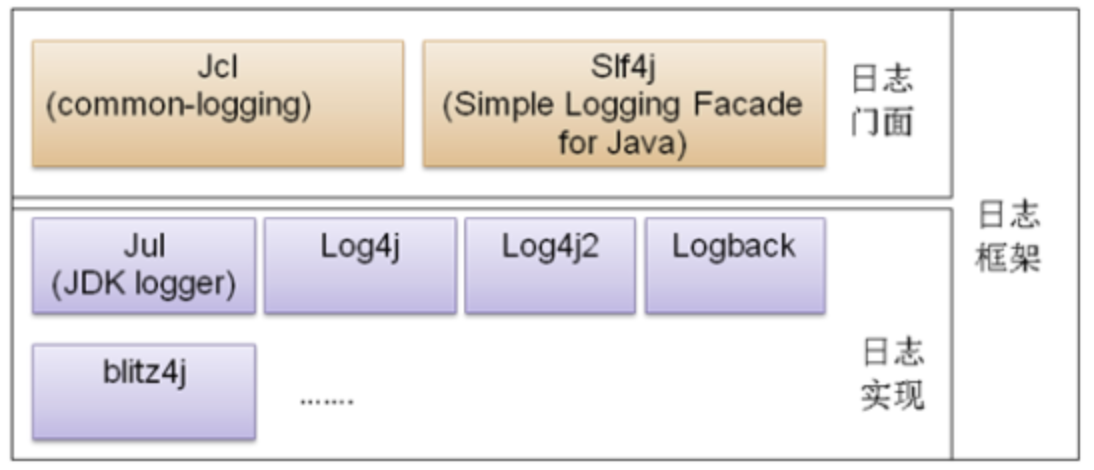
Up to now, Java has developed a complete logging system, which is divided into a logging facade and specific logging implementations. The logging facade is equivalent to an interface, while the various logging frameworks are actually different implementations of that facade.
Java logging loading relies on SPI. Unlike API, in the SPI pattern the interface is on the caller’s side, while developers only provide the concrete implementations. In the API pattern, both the interface and the concrete implementation are on the developer’s side, and the caller does not need to care about the specific implementation, but only needs to call the interface provided by the developer.
The SPI mechanism gives programs the ability to load dynamically. During program runtime, it dynamically scans for the corresponding implementation classes of an interface and loads them.
For example, the logging facade Slf4j in Java has corresponding implementations such as Spring Boot’s built-in and default Logback, as well as Log4j and Log4j2. When used, it dynamically loads the Slf4j implementation class that exists in the classpath and uses it. This is the SPI mechanism.
Logback
Logback is the default logging implementation used by Spring Boot. It can be used directly even without configuration.
publicstaticvoidmain(String[] args) { SpringApplication.run(RedisUsageApplication.class, args); Loggerlog= LoggerFactory.getLogger("RedisUsageApplication.class"); log.warn("Easy bro, this is a fake warn lol."); log.error("Easy bro, this is a fake error lol."); } }
You can also use the annotation @Slf4j provided by Lombok to output logs, which is more concise.
publicstaticvoidmain(String[] args) { SpringApplication.run(RedisUsageApplication.class, args); log.warn("Easy bro, this is a fake warn lol."); log.error("Easy bro, this is a fake error lol."); } }
However, the default configuration still cannot precisely meet various needs, so custom configuration is required.
Create logback.xml or logback-spring.xml under the classpath.
<!-- Logback log levels: ERROR > WARN > INFO > DEBUG > TRACE --> <configuration> <includeresource="org/springframework/boot/logging/logback/defaults.xml" /> <!-- Define the log file name --> <propertyname="APP_NAME"value="log-files" /> <!-- Define the log file path --> <propertyname="LOG_PATH"value="${user.home}/${APP_NAME}" /> <!-- Define the log file name --> <propertyname="LOG_FILE"value="${LOG_PATH}/redis-usage.log" />
<!-- Rolling log recording: first record logs to the specified file, and when certain conditions are met, record logs to other files --> <appendername="APPLICATION" class="ch.qos.logback.core.rolling.RollingFileAppender"> <!-- Specify the log file name --> <file>${LOG_FILE}</file> <!-- When rolling occurs, determines the behavior of RollingFileAppender, involving file moving and renaming TimeBasedRollingPolicy: The most commonly used rolling strategy. It formulates the rolling strategy based on time and is responsible for both rolling and triggering rolling. --> <rollingPolicyclass="ch.qos.logback.core.rolling.TimeBasedRollingPolicy"> <!-- The storage location and file name of the files generated during rolling %d{yyyy-MM-dd}: Roll logs daily %i: When the file size exceeds maxFileSize, roll files according to i --> <fileNamePattern>${LOG_FILE}.%d{yyyy-MM-dd}.%i.log</fileNamePattern> <!-- Optional node that controls the maximum number of archived files to retain. When exceeded, old files will be deleted. For example, if rolling daily and maxHistory is set to 7, only the latest 7 days of files will be kept. Note that when deleting old files, directories created for archiving will also be deleted. --> <maxHistory>7</maxHistory> <!-- When the log file exceeds the size specified by maxFileSize, roll according to %i mentioned above. Note that configuring SizeBasedTriggeringPolicy alone cannot achieve size-based rolling. You must configure timeBasedFileNamingAndTriggeringPolicy. --> <timeBasedFileNamingAndTriggeringPolicyclass="ch.qos.logback.core.rolling.SizeAndTimeBasedFNATP"> <maxFileSize>50MB</maxFileSize> </timeBasedFileNamingAndTriggeringPolicy> </rollingPolicy> <!-- Log output format: --> <layoutclass="ch.qos.logback.classic.PatternLayout"> <pattern>%d{yyyy-MM-dd HH:mm:ss.SSS} [ %thread ] - [ %-5level ] [ %logger{50} : %line ] - %msg%n</pattern> </layout> </appender>
<!-- ch.qos.logback.core.ConsoleAppender represents console output --> <appendername="CONSOLE"class="ch.qos.logback.core.ConsoleAppender"> <!-- Log output format: %d represents date and time, %green green %thread represents thread name, %magenta magenta %-5level: level left-aligned with 5-character width, %highlight highlighted color %logger{36} means logger name up to 36 characters, otherwise split by dot, %yellow yellow %msg: log message %n is a newline --> <layoutclass="ch.qos.logback.classic.PatternLayout"> <pattern>%green(%d{yyyy-MM-dd HH:mm:ss.SSS}) [%magenta(%thread)] %highlight(%-5level) %yellow(%logger{36}): %msg%n</pattern> </layout> </appender>
<!-- root and logger have a parent-child relationship. If not specifically defined, the default is root. Any class will only correspond to one logger, either a defined logger or root. The key is to find that logger and then determine its appender and level. --> <rootlevel="info"> <appender-refref="CONSOLE" /> <appender-refref="APPLICATION" /> </root> </configuration>
In log configuration, there are several tags:
property: You can customize variable names and values to facilitate path concatenation.
appender: Each appender corresponds to a log output destination.
layout: Log output format
rollingPolicy: Log rolling strategy
Through these tags, full customization of logging can be achieved.
When using Logback, you can add Logback configuration in application.yml or application.properties, but it is not necessary, because Spring Boot’s default behavior is to scan whether there is a logback.xml or logback-spring.xml under the classpath.
1
2
logging: config:classpath:logback-spring.xml
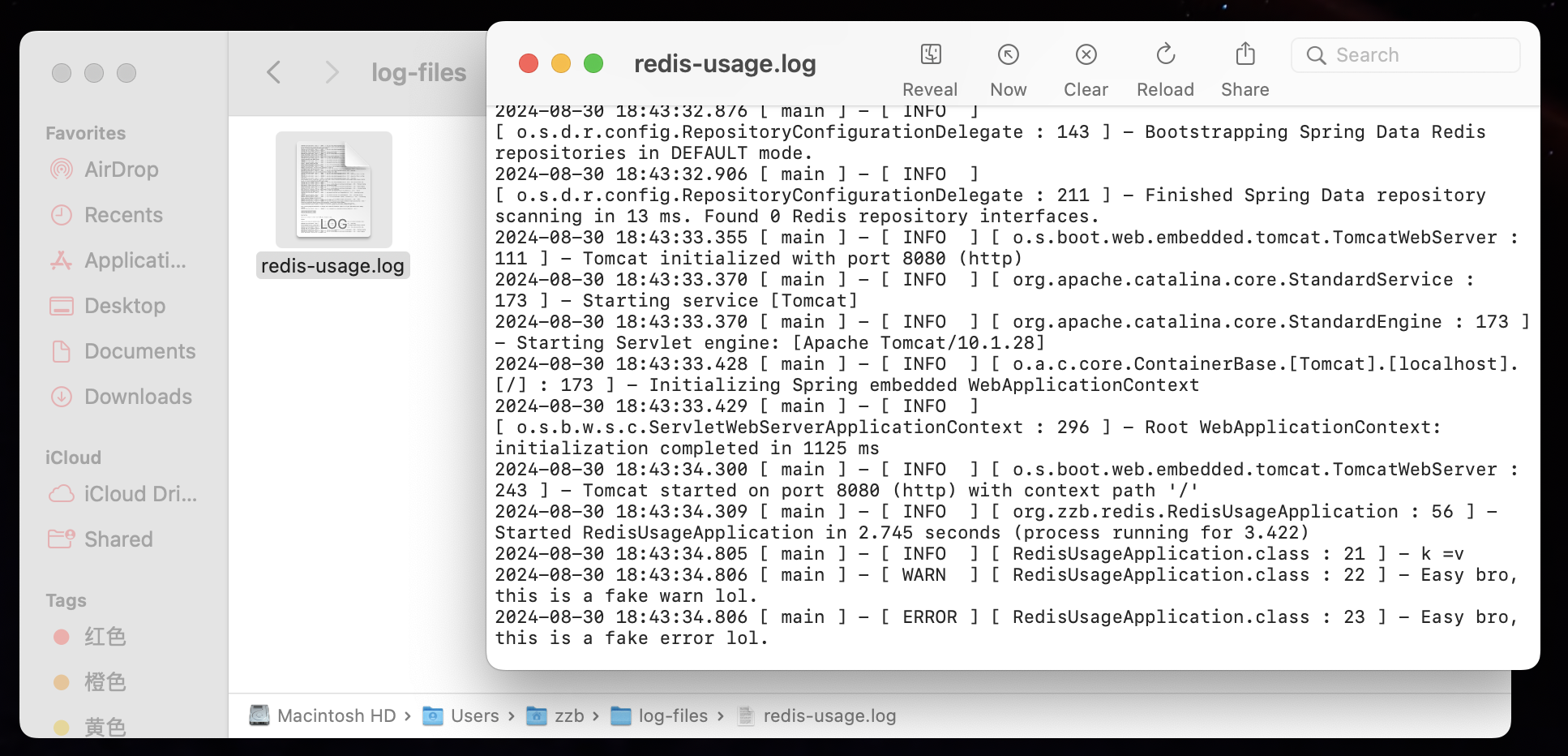
At the same time, the log files can be found in the corresponding directory.
Log4j2
Log4j2 and Logback are both implementations of Slf4j, but in practical applications they cannot coexist; otherwise, an error will occur and the logging implementation class cannot be loaded properly.
Therefore, when using Log4j2, you need to explicitly exclude the Logback dependency in pom.xml and add the Log4j2 dependency.
<?xml version="1.0" encoding="UTF-8"?> <!-- Log4j2 log levels: OFF > FATAL > ERROR > WARN > INFO > DEBUG > ALL --> <Configuration> <!--<Configuration status="WARN" monitorInterval="30"> --> <properties> <propertyname="LOG_HOME">./service-logs</property> </properties> <Appenders> <!--*********************Console Log***********************--> <Consolename="consoleAppender"target="SYSTEM_OUT"> <!-- Set log format and color --> <PatternLayout pattern="%style{%d{ISO8601}}{bright,green} %highlight{%-5level} [%style{%t}{bright,blue}] %style{%C{}}{bright,yellow}: %msg%n%style{%throwable}{red}" disableAnsi="false"noConsoleNoAnsi="false"/> </Console>
<!--*********************File Log***********************--> <!-- all level logs --> <RollingFilename="allFileAppender" fileName="${LOG_HOME}/all.log" filePattern="${LOG_HOME}/$${date:yyyy-MM}/all-%d{yyyy-MM-dd}-%i.log.gz"> <!-- Set log format --> <PatternLayout> <pattern>%d %p %C{} [%t] %m%n</pattern> </PatternLayout> <Policies> <!-- Set log file splitting parameters --> <!--<OnStartupTriggeringPolicy/>--> <!-- Set base log file size, roll when exceeding this size --> <SizeBasedTriggeringPolicysize="100 MB"/> <!-- Set time-based rolling, depends on filePattern --> <TimeBasedTriggeringPolicy/> </Policies> <!-- Set maximum number of log files --> <DefaultRolloverStrategymax="100"/> </RollingFile>
publicstaticvoidmain(String[] args) { SpringApplication.run(Log4j2UsageApplication.class, args); log.warn("this is form log4j2."); } }
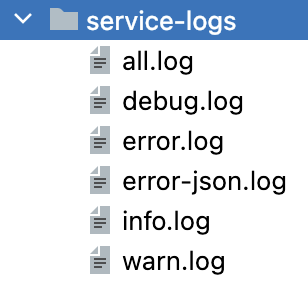
At the same time, according to the configuration in log4j2.xml, you can find log records categorized by level in the corresponding directory.
## Introduction
Over the years, Java has developed a complete logging system, which is divided into a logging facade and specific logging implementations. The logging facade acts like an interface, while the various logging frameworks are different implementations of that facade.
Java logging loading relies on SPI. Unlike API, in the SPI pattern the interface is on the caller’s side, while developers only provide concrete implementations. In the API pattern, both the interface and the implementation are provided by the developer, and the caller only needs to use the interface without caring about the implementation details.
The SPI mechanism gives programs the ability to load implementations dynamically. During runtime, the program scans for implementation classes corresponding to an interface and loads them dynamically.
For example, the logging facade Slf4j in Java has multiple implementations, such as Spring Boot’s default Logback, as well as Log4j and Log4j2. At runtime, it dynamically loads the corresponding Slf4j implementation found in the classpath. This is the SPI mechanism in action.
Logback
Logback is the default logging implementation used by Spring Boot. It can be used directly even without configuration.
publicstaticvoidmain(String[] args) { SpringApplication.run(RedisUsageApplication.class, args); Loggerlog= LoggerFactory.getLogger("RedisUsageApplication.class"); log.warn("Easy bro, this is a fake warn lol."); log.error("Easy bro, this is a fake error lol."); } }
You can also use the Lombok annotation @Slf4j to output logs, which is more concise.
publicstaticvoidmain(String[] args) { SpringApplication.run(RedisUsageApplication.class, args); log.warn("Easy bro, this is a fake warn lol."); log.error("Easy bro, this is a fake error lol."); } }
However, the default configuration cannot precisely meet various needs, so custom configuration is often required.
Create logback.xml or logback-spring.xml under the classpath:
property: Define custom variables for easier path construction.
appender: Each appender represents a log output destination.
layout: Defines the log output format.
rollingPolicy: Defines the log rolling strategy.
Spring Boot automatically scans for logback.xml or logback-spring.xml under the classpath.
1
2
logging: config:classpath:logback-spring.xml
Log files can be found in the corresponding directory:
Log4j2
Both Log4j2 and Logback are implementations of Slf4j, but they cannot coexist in the same project. Otherwise, an error will occur because multiple logging implementations are detected.
When using Log4j2, you need to exclude Logback in pom.xml and add the Log4j2 dependency:
Hello everyone,I'm 4pril. This website is solely for recording the learning process and the journey of coding. If there is any infringement, please feel free to contact me. Meanwhile, I welcome everyone to share and exchange experiences with me. Have fun ;)




 ## Introduction